This is featured post 1 title

Lorem ipsum dolor sit amet, consectetur adipisicing elit, sed do eiusmod tempor incididunt ut labore et dolore magna aliqua. Ut enim ad minim veniam, quis nostrud exercitation test link ullamco laboris nisi ut aliquip ex ea commodo consequat.

This is featured post 2 title

Lorem ipsum dolor sit amet, consectetur adipisicing elit, sed do eiusmod tempor incididunt ut labore et dolore magna aliqua. Ut enim ad minim veniam, quis nostrud exercitation test link ullamco laboris nisi ut aliquip ex ea commodo consequat.

This is featured post 3 title

Lorem ipsum dolor sit amet, consectetur adipisicing elit, sed do eiusmod tempor incididunt ut labore et dolore magna aliqua. Ut enim ad minim veniam, quis nostrud exercitation test link ullamco laboris nisi ut aliquip ex ea commodo consequat.

This is featured post 4 title

Lorem ipsum dolor sit amet, consectetur adipisicing elit, sed do eiusmod tempor incididunt ut labore et dolore magna aliqua. Ut enim ad minim veniam, quis nostrud exercitation test link ullamco laboris nisi ut aliquip ex ea commodo consequat.

This is featured post 5 title

Lorem ipsum dolor sit amet, consectetur adipisicing elit, sed do eiusmod tempor incididunt ut labore et dolore magna aliqua. Ut enim ad minim veniam, quis nostrud exercitation test link ullamco laboris nisi ut aliquip ex ea commodo consequat.


Apple iPhone OS 4.0 dan SDK Beta 2 Sudah Dirilis

0 komentar

 Apple baru saja merilis versi BETA 2 dari iPhone OS 4 untuk pengembang sehingga mereka bisa membuat aplikasi baru utk iPhone OS 4 atau mengupdate aplikasi yang telah mereka buat di mana versi sebelumnya dirilis pada awal bulan ini.

Download Windows Phone 7 SDK & Visual Studio 10 Express Gratis

0 komentar


Ayo Download Windows Phone 7 SDK yang sudah tersedia bagi developer untuk mulai mengembangkan aplikasi-aplikasi untuk platform baru untuk smartphone dari Microsoft ini. Tool yang tersedia untuk pengembangan aplikasi windows phone 7 bagi para developer adalah:

Joomla Luncurkan CMS Joomla 1.7.3 Terbaru Dengan Perbaikan Sistem Keamanan

0 komentar


Joomla baru saja meluncurkan content management system (CMS) terbarunya, yakni Joomla 1.7.3. Update terbaru ini datang dengan berbagai perbaikan, terutama pada sistem keamanannya.

Apple Tingkatkan Suite Untuk Aplikasi iCloud Terbaru

0 komentar


Apple dikabarkan akan segera meningkatkan suite untuk aplikasi terbarunya, yakni iCloud. minat Apple untuk meningkatkan iCloud lebih jauh telah diungkapkan pekan ini. Hal itu bisa dilihat karena beberapa hari ini perusahaan tersebut mencari seorang iCloud Application Developer di kantor pusat di Cupertino, California.
Apple Insider melaporkan, tim iCloud sedang mencari insinyur yang kreatif, mempunyai pikiran untuk membangun generasi berikutnya, aplikasi klien yang mengintegrasikan dengan satu set layanan berbasis cloud. Posisi tersebut membutuhkan sesorang yang akan mengembangkan aplikasi baru atau yang sudah ada di iPhone dan iPad untuk layanan iCloud.

Firefox Versi 9 Tersedia Untuk Tablet Android

0 komentar


  Setelah mengumumkan kedatangan versi terbaru dari Firefox, yakni Firefox versi 9 untuk PC dan perangkat sejenisnya, Firefox kini menyediakan Firefox versi 9 untuk tablet android.

Download Norton Internet Security 2012 19.1.13

0 komentar


download button


Norton Internet Security description

Here are some key features of "Norton Internet Security":

Engineered for Speed:
· Proven fastest and lightest security suite available
· Intelligence-driven Norton Insight technology targets only those files at risk for faster, fewer, shorter scans
· Installs in under one minute on average requires less than 7 MB of memory
· Up-to-the-minute Protection
· Delivers up-to-the-minute protection with rapid pulse updates every 5 to 15 minutes.
· The Norton Protection System provides multilayered protection technologies that work in concert to stop threats before they impact you.
· Real-time SONAR (Symantec Online Network for Advanced Response) helps prevent bots from taking control of your PC.
· Prevents threats from entering through your firewall.
· Detects and automatically removes online threats.
· Defends against Web-based attacks with patent-pending technology.
· Recovery Tool boots and repairs badly infected PCs
· Delivers our most complete deep-cleaning scan possible.
· Prevents bots from taking control of your PC.
· Norton Ongoing Protection provides continuous protection updates and new product features as they become available throughout your product subscription period, helping to keep your computer protected against the latest Internet threats and risks.

Bermain dengan Emulator Android v1.6 Donut

0 komentar


ANDROID adalah sistem operasi untuk perangkat seluler berbasis Linux yang menyediakan platform terbuka bagi para pengembang untuk menciptakan aplikasi mereka sendiri yang dapat digunakan oleh bermacam peranti bergerak. Awalnya, Google Inc. membeli Android Inc., —pendatang baru yang membuat peranti lunak untuk ponsel. Kemudian untuk mengembangkan Android, dibentuklah Open Handset Alliance, konsorsium dari 34 perusahaan peranti keras, peranti lunak, dan telekomunikasi, termasuk Google, HTC, Intel Corp., Motorola, Qualcomm, T-Mobile, dan Nvidia.

Platform android bisa didistribusikan secara terbuka [open source] sehingga programmer bisa membuat aplikasi baru di dalamnya, terdapat Android Market yang menyediakan ribuan aplikasi baik gratis maupun berbayar, serta memiliki aplikasi native Google yang terintegrasi, seperti push email GMail, GoogleMaps, dan GoogleCalendar. Android secara resmi masuk pasar Indonesia awal Maret 2010 dan mendapat respon positif karenanya terus berkembang hingga saat ini.
Bagi Anda yang ingin mengenal lebih jauh platform android berikut saya share emulator android v1.6 Donut Windows full fitur namun tanpa fasilitas panggilan dan sms, skaligus mengakses Android Market dan menginstall ribuan aplikasi di emulator, langsung dari Android Market. Android selalu menamakan tiap versi dengan kode nama dari macam makanan, seperti Cupcake 1.5, Donut 1.6, Eclair 2.0/2.1, Frozen yogurt atau biasa dikenal dengan nama Froyo 2.2, dan Gingerbread 3.x. Dengan simulator ini anda bisa mengotak-atik sehingga lebih mengenal dan memahami platform ponsel android sebelum membelinya nanti. Berikut langkah-langkah menjalankan emulator:
1. Unduh Android SDK dari http://developer.android.com/sdk/index.html
Kemudian Install Platform Android 1.6 dari android.bat [\folderInstalasiAndroidSDK\tools\android.bat] tampilannya sepewrti di bawah ini


2. Buat AVD [Android Virtual Device] baru melalui android.bat yang ada di folder tempat anda menaruh Android SDK di komputer anda [\folderInstalasiAndroidSDK\tools\android.bat].


3. Ambil System Image dari HTC [signed-dream_devphone_userdebug-img-14721.zip] dari http://developer.htc.com/adp.html#s3 filenya: signed-dream_devphone_userdebug-img-14721.zip [mendukung sampai Android 1.6]. Mohon maaf, sampai saat ini saya hanya mengetahui system image yang disediakan oleh HTC [apabila ada yang mengetahui system image selain HTC silahkan share ke saya, thx]


4. Unzip isi file zip tersebut (system.img) dan kopi ke direktori penyimpanan AVD android [Windows XP: C:\Documents and Settings\NAMA_USER_WINDOWS_ANDA\.android\avd\Android1.6.avd\] replace system.img yang ada di folder tersebut.

5. Jalankan AVD tersebut dari android.bat, centang dialogbox Wipe User Data jika anda menjalankan sistem ini untuk pertama kali. Untuk selanjutnya tidak perlu di centang lagi.


6. Jika emulator sudah jalan dan masuk ke sistem android, tekan logo android, abaikan SignIn Google Account [dapat dilakukan nanti waktu belanja di AndroidMarket karena kalau langsung sign in akan muncul pesan dari system agar membuka slider ini kan jelas tidak mungkin, makanya untuk mengakali hal ini sign in di Gmail atau di AndroidMarket saja]


7. Coba klik browser untuk mencoba koneksi internet
 8. Klik menu Android Market, Sign In menggunakan akun Google anda, lalu pilih aplikasi yang ingin anda coba [saya mencoba install Facebook for Android, WordPress, dan Foursquare]
AndroidMarket

9. Silahkan bermain-main dengan Emulator Android dan sekaligus mencoba ribuan aplikasi dari android market

selamat mencoba… 
ini link ya....

Android Sync Manager WiFi

0 komentar

Software Download

For using Android Sync Manager, you must download the two software below:
1. Install Android Sync Manager WiFi on PC Android Sync Manager WiFi 
(Latest Android Sync Manager WiFi Version: 2.2.1110.2763)
Please click "Help > About Android Manager" on your PC software to check the version of Android Sync Manager WiFi software"
2. Install Android Sync Manager WiFi Agent on your Android phone, you can download from any one of the download links below.
a. [Download from Android Market] Recommended
Please go to Apps > Tools to search and install the Android Sync Manager WiFi software.

(Latest Android Sync Manager WiFi agent Version: 2.2.1110.2763)
Please open Android Sync Manager WiFi agent on your Android phone, and then click "About" button to check the version of Android Sync Manager WiFi agent"
 

b. [Download from Mobile Action]
Please input the link below on your Android phone to download it
http://ds.mobileaction.com/android/amagentwifi.apk
(Latest Android Sync Manager WiFi agent Version: 2.2.1110.2763) 
zoon-in when you click the this

Download Kaspersky Anti-Virus 7.0 (5 licenses) and Crack

0 komentar

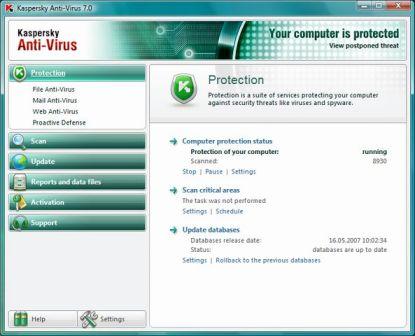
    Kaspersky AntiVirus 7
  • Version: 7.0
  • Downloads Count: 35,149
  • License Type: Trial
  • Price: $140
  • Date Added: Jan 24, 2011
  • Operating Systems: Microsoft Windows NT 4.0, Microsoft Windows 2000, Microsoft Windows XP
  • Author: Kaspersky Lab UK Limited


Crack : 

Simply follow the following steps to get your own personal genuine KAV 7.0 activation key which won't get blacklisted.
  1. Visit this Registration page at YuvaYantra.

Download Panda Cloud Antivirus-Free Edition

1 komentar


  • Version: 
    1.3
  • Downloads Count: 26,333
  • License Type: Free
  • Price: Free
  • Date Added: Nov 10, 2010
  • Operating Systems: Microsoft Windows XP, Microsoft Windows Vista, Microsoft Windows 7
  • Requirements: 32- or 64-bit OS, 64MB RAM, 100MB hard disk space
  • File Size: 302.0 KB
  • Author: Panda Security

Ice Cream Sandwich – from source code release to software upgrade

0 komentar

Sony-Ericsson-ICS-bring-up

A couple of weeks ago, the source code for Ice Cream Sandwich (Android™ 4.0) was released. This meant the start of an intensive period for the engineers at Sony Ericsson, in order to create a working, stable and certified software release of Ice Cream Sandwich for our 2011 Xperia™ phones.
In our pursuit for greater openness in the Android community, we would like to share some exclusive information of the different phases and activities of Sony Ericsson’s Android development, starting with the release of the Ice Cream Sandwich source code, and leading up to the release of a software upgrade for you to download on your phone. Find out more after the jump!
On the Sony Ericsson Product Blog, we have previously announced that all our 2011 Xperia™ phones will receive software upgrades  to Ice Cream Sandwich (please check the Sony Ericsson Product Blog for upcoming announcements regarding the timing for these software upgrades). However, before we can roll out those software upgrades, there are a lot of activities to first of all get Ice Cream Sandwich to work and become stable on all Sony Ericsson phones. We call this the Bring up phase.

Sony Ericsson Explains Procedure For Android Software Update

0 komentar

sony ericsson explains procedure for android 4 0 software update 300x225 Sony Ericsson Explains Procedure For Android Software Update
Sony Ericsson has elaborated its procedure to create Android software update and explain why owners of its devices have to hold back while the company works on the highly anticipated Android 4.0 Ice Cream Sandwich update.
The first phase involves the integration of Ice Cream Sandwich and Sony Ericsson source codes and fixing of problems as early as possible before the merger takes place.
Unfortunately, Google created Android 4.0 ICS with optimization for components from Texas Instruments, so Sony Ericsson has to first use counterparts for the Xperia lineup’s Qualcomm 8255 chipset.
Now, the process is not as easy as using the same Android software update for all Xperia devices just because each contain the same chipset.
Chipsets are only the first thing to worry about in creating code from scratch, as hardware peripherals such as Bluetooth, cameras, GPS, sensors, Wi-Fi, etc. differ from one device to another, which is also true for other phone makers.
For everything to play out properly, Sony Ericsson must include support for those components using their respective drivers in the Hardware Abstraction Layer (HAL).
The changes insert into the newly coded software for testing, and after a successful run, the phone maker still has to apply and receive official certification that the result meets certain standards.
Sony Ericsson divulged that it often applies for global certification on its devices but on certain conditions, also applies individually for specific markets in various countries.

Download ESET NOD32 Antivirus 5.0.95.0

1 komentar


ESET NOD32 Antivirus description


download button


Smarter Scanner:
· Threats don't always enter your network in ways you expect. ESET NOD32 Antivirus inspects SSL-encrypted communication channels like HTTPS and POP3S and intelligently scans compressed files to find hidden threats other products miss. Proactive protection begins at the earliest point in system startup to ensure your computer is always secure.

Clean and Safe Email:
· Email scanning for Microsoft Outlook, Outlook Express, Mozilla Thunderbird, Windows Live Mail, Windows Mail, and other POP3/IMAP mail clients, ensuring your email is free of viruses and other threats.

Removable Media Security:
· Threats can enter your PC from removable media such as USB thumb drives. For self-running media, ESET NOD32 Antivirus scans autorun.inf and associated files when the medium is inserted, in addition to scanning any file on any removable device when it is accessed, or during a full-scan of the media. Power users can adjust ESET NOD32 Antivirus to perform additional levels of scanning on removable media.

System Tools:
· ESET SysInspector and ESET SysRescue simplify diagnosing and cleaning of infected systems by allowing deep scans of system processes to find hidden threats, and creating bootable rescue CD/DVD or USB drives to help you repair an infected computer.

Self Defense:
· ESET NOD32 Antivirus has built-in technology to prevent malicious software from corrupting or disabling it, so you can rest assured your system is always protected.

Many Usability Improvements:
· Energy-sipping battery mode extends laptop battery life without compromising security
· Advanced Protection Status screen informs you of threat detections
· Information pop-ups are hidden when running full screen applications like games, video players or presentations
· Password protection prevents ESET NOD32 Antivirus from being uninstalled by strangers
· New interface and keyboard shortcuts simplify use for visually impaired users
Requirements:

· Memory: 44 MB
· Disk Space (Download): 28 MB
· Disk Space (Installation): 35 MB
Limitations:

· The trial version is for non-commercial, trial purposes, only. The trial period is limited to a 30-day period. After expiration of the trial period, NOD32 has to be uninstalled or purchased.
What's New in This Release: [ read full changelog ]

· Fix: issues with installation on other than default location
· Fix: issues with re-activation of product in a case of no internet connectio
n


My Statistik

Diberdayakan oleh Blogger.